
Zombie AI Trend: What It Is, the Prompts and How to Make It
Someone you love has turned, you cannot pull the trigger, and the clip cuts to your happiest memory. This guide covers where the zombie AI trend came from, which apps people use for it, the prompts you can copy, and the quickest way to make your own.
- Real trend examples
- Copyable prompts
- Apps compared
- Couples, friends or pets
- Tips for recognisable faces
Zombie AI trend examples
The same three beats every time: the turn, the gun that never fires, the memory. Couples, a cartoon pair and a cat who comes back.
Made with the Zombie AI generator
Two fictional portraits in, ten seconds out: she turns in an abandoned house, he cannot shoot, then the sunset hug and the gun lowered.
She turned in the kitchen
A white shirt, a wrecked kitchen and a snarl, then the two of them lying in a sunny field. The vertical cut the trend is posted in.
The cat crosses the rubble
Not every version is a couple. A ginger cat walks to her through a collapsed building, then it is a sunset meadow and autumn leaves.
An animated couple in a snowy cabin
The cartoon look softens the horror and makes the flashback hit harder: a grey zombie in a dark cabin, then laughing on a snowy hillside.
Noodles with the wife who turned
He eats at the kitchen table, eyes wet, while she sits tied to her chair. Then the same table, the same meal, both of them laughing.
The gun, then the memories
One aim at the doorway, then three memories in a row: a hug in a field, the sofa, a boat on a lake. The longer cut of the story.
What is the zombie AI trend?
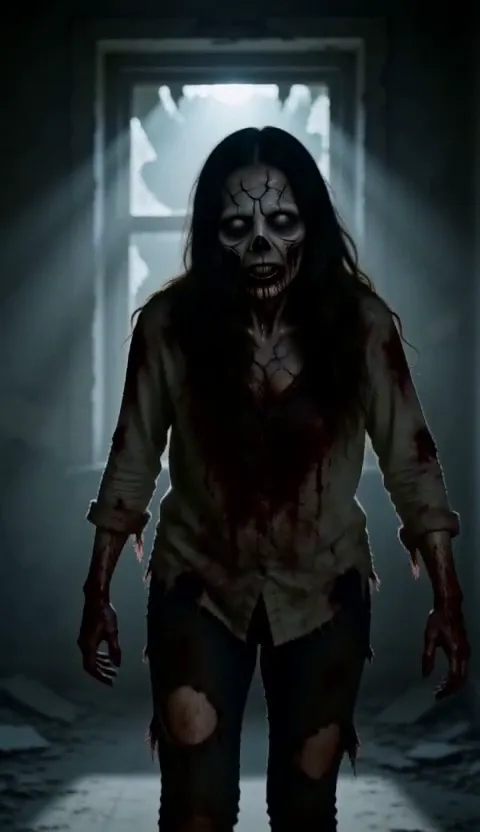
The zombie AI trend is a short, sad movie made from two photos. One person has turned into a zombie in a dark, abandoned room. The other raises a gun, crying, and cannot pull the trigger. Then it cuts to a bright memory of the two of them together, and back to the gun being lowered.
It took off on TikTok and Instagram Reels in autumn 2026, just ahead of Halloween. People post it with their partner, their best friend, their mum or their dog as the one who turns, and the comments split between crying and laughing. You will see it called the zombie AI trend, the AI zombie trend, the zombie love story or simply the zombie trend.
Nobody seems sure who posted it first: creators credit each other in the captions and there are now hundreds of versions. What they share is the structure, four beats in under thirty seconds, and that is why the same prompt works for a couple, a pair of friends or a dog.
Which app is used for the zombie AI trend?
There is no single zombie filter behind the trend. The tutorials going around use one of these, often two of them together.
Dreamina templates
CapCut’s AI video app has a ready-made zombie trend template: add a photo of the one who turns and it animates the scene.
Higgsfield
Its character swap replaces the actors in an existing zombie clip with you and your partner or pet, keeping the original performance and camera moves.
PixVerse
Its zombie effect turns one photo into a short transformation, and it is behind several of the zombie tragedies shared on Reddit and Reels.
Seedance and other video models
With two reference images and a long prompt, models such as Seedance 2.5 can write the whole scene. Expect a few retries before both faces hold.
CapCut
Used to splice the dark scene and the memory together, add the trending sound and caption it for TikTok.
Zombie AI
The one-step route: two photos in, the turn, the gun and the memory out as one vertical clip with music, no prompt and no editing.
How to make a zombie AI trend video: three ways
- 1
One click on the Zombie AI generator
Upload photo 1 (the one holding the gun) and photo 2 (the one who turns), choose a person, a pet or the cartoon version, and press generate. The full story comes back in one to three minutes.
- 2
Any video generator that takes two reference images
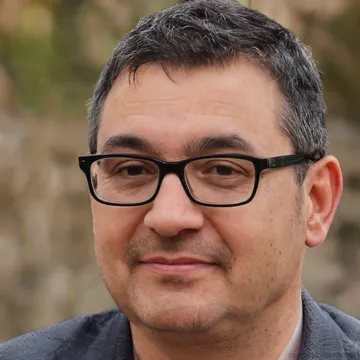
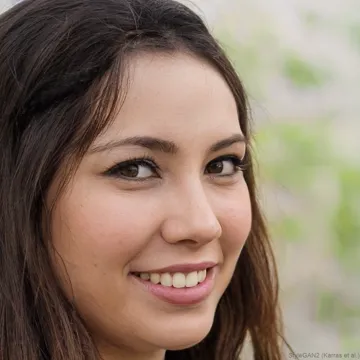
Copy one of the prompts below, give it Image 1 as the one holding the gun and Image 2 as the one who turns, and run it. Re-roll until both faces look right.
- 3
Separate clips cut together in CapCut
Make the zombie scene and the memory as two clips, then cut them together in CapCut with a slow track. Most work, most control.
Zombie AI trend prompts you can copy
These are the prompts the Zombie AI generator sends for you. To run the zombie AI trend in another video generator, copy the one you need: each works with any model that takes two reference images, with Image 1 as the one holding the gun and Image 2 as the one who turns.
Zombie AI trend prompt for a couple or two friends
Image 1 is the Survivor. Image 2 is the Loved One. A vertical cinematic short film about a zombie apocalypse, four beats in one clip. Shot 1: in a dim, dusty abandoned house, the Loved One from Image 2 has turned into a zombie - grey cracked skin, dark veins, clouded white eyes, torn bloodied clothes - and staggers toward the camera with a low snarl; it is still clearly their own face and hair under the zombie make-up. Shot 2: close-up of the Survivor from Image 1 raising a pistol with shaking hands, tears running down their face, unable to pull the trigger. Shot 3: a warm golden flashback - the Survivor and the Loved One, human again, laughing and hugging in a sunset field, both looking exactly like their reference images. Shot 4: back in the dark room, the Survivor slowly lowers the gun. Keep each person's face, hairstyle and build exactly as in their reference image and never swap them. Cinematic film look, shallow depth of field, slow emotional piano score, no dialogue. No other people, no text, no logos.
Zombie AI trend prompt where your pet turns
Same four shots as the prompt for two people, but Image 2 is your dog or cat: matted grey fur, clouded eyes and a torn collar, then a sunny meadow where it bounds back into your arms. Copy it to get the full text.
Zombie AI trend prompt in a cartoon style
Same story drawn as a 3D animated film: both of you as cartoon characters who keep your face shape, hair and clothes, a grey-green zombie, big cartoon tears and a snowy-hill flashback. Copy it to get the full text.
Zombie AI trend video or zombie filter?
Search for "AI zombie" and you will find two different things. A zombie filter turns one photo into a still zombie picture. The zombie AI trend is a video with a story.
| Zombie AI generator | Zombie photo filter | Do-it-yourself recipe | |
|---|---|---|---|
| Examples | zombieai.net | Snapchat lenses, Fotor, CapCut effects | An AI video app, a prompt and an editor |
| What you upload | Two photos | One photo | Two photos plus the memory scenes |
| What you get | A video: the turn, the gun, the memory | A still image of one zombie face | Separate clips you cut together |
| Looks like the trend | Yes, all the beats in one clip | No, it is a single picture | Yes, after several tries |
| Effort | One click, one to three minutes | One click, seconds | Prompt writing, retries and editing |
If you just want to see your own face zombified, a filter is enough. If you want the clip that is all over TikTok and Reels, use the generator or the prompts above.
Tips for a better zombie AI video
One face per photo
Crop group shots down to one person. Two faces in one reference is the usual reason the wrong person turns.
Front-facing and sharp
The survivor gets a close-up full of tears. A clear, front-on photo is what keeps that close-up looking like them.
Show the clothes
A waist-up photo gets the outfit right in the flashback hug. A tight selfie leaves the model guessing.
Pets: photograph them head-on
Clear eyes and markings are what make the zombie dog or cat still read as yours, and the healthy one in the memory.
Ten seconds first
Ten seconds already carries the whole story. Go to fifteen once you like how the faces come out.
Is the zombie AI trend free?
The prompts on this page are free to copy into any generator you already use. On the Zombie AI generator, a clip costs 400 credits for 10 seconds and 600 for 15. New accounts get 100 free credits, enough to look around but not for a clip.
The smallest credit pack is 600 credits for $9.9, with no subscription. Uploading photos costs nothing, and if a render fails the credits go straight back to your balance.
Make it with people who said yes
- Only upload photos you have the right to use: yourself, a partner or friends who agreed, your own pets.
- Leave out children and anyone who has not agreed, including celebrities and other public figures.
- The story shows a gun and a zombie. Keep it for audiences and platforms where that is fine.
- Label the post as AI-generated wherever the platform asks you to.
Zombie AI trend FAQ
What is the zombie AI trend?
It is a short AI video made from two photos: one person has turned into a zombie, the other aims a gun and cannot shoot, then it cuts to a happy memory of the two of them. It went viral on TikTok and Reels ahead of Halloween 2026.
What app is used for the zombie trend?
There is no single app. Tutorials use Dreamina templates, Higgsfield, PixVerse or Seedance for the video and CapCut to splice in the memory. The Zombie AI generator does the whole story in one step from two photos.
How do I make a zombie AI video of myself?
Upload your photo as photo 1 and the person who turns as photo 2 on the Zombie AI generator, then press "Make my zombie video". Or copy a prompt from this page into any video generator that takes two reference images.
Is the zombie AI trend free?
The prompts are free to copy. On the Zombie AI generator, rendering uses credits: 400 for 10 seconds or 600 for 15. The free credits on a new account are not enough for a clip, and failed renders are refunded.
Can my dog or cat be the one who turns?
Yes. Use the pet prompt, or choose My pet on the generator, with a clear, head-on photo of your pet as photo 2. It turns into a zombie animal, then comes back healthy in the memory.
Can I make it as a cartoon?
Yes. The cartoon prompt draws both of you as 3D animated characters that keep your face shape, hair and clothes. It softens the horror and is a favourite for couples.
How can I turn my photo into a zombie?
For a still picture of one face, any zombie filter will do. For the trend video, where one of two people turns and the other remembers, you need two photos and a video model.
Do I need PixVerse, CapCut or another app?
Not if you use the Zombie AI generator: it runs in the browser on a phone or a computer, with no template to find and no memory scene to splice in yourself.
What song is used in the zombie AI trend?
Versions differ, but most use a slow, emotional piano or string track. Clips from the Zombie AI generator come with a score like that and no dialogue, so they also work under a trending sound.
What if the wrong person turns into the zombie?
Image 2 is always the one who turns. Check the order before you start, and use one face per photo; a group shot is the usual cause of a mix-up.
Ready to make yours?
Skip the prompts and the editing: two photos on the Zombie AI generator is all it takes.
Open the Zombie AI generatorOutils associés
D’autres pages qui ouvrent le même studio, préparé pour un autre type de vidéo.