
AI Dance Video: Make Any Photo Dance
Add one clear, full-body photo, pick a dance and press the button. A few minutes later you get a vertical clip of that same person (or pet) dancing on a beat, ready for TikTok, Reels or Shorts. It runs in the browser, so there is no app to install and no prompt to write.
One vertical 9:16 clip with music per click. Failed renders give their credits back.
AI dance videos made from one photo
Each clip below started as the single still next to it. The dancer keeps the face, the hair and the clothes from the photo while the body does something the photo never did.
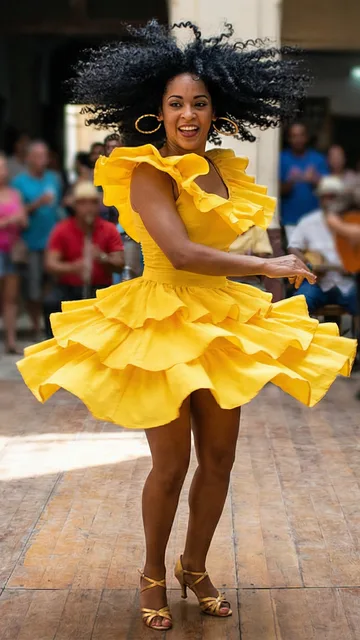 The photo
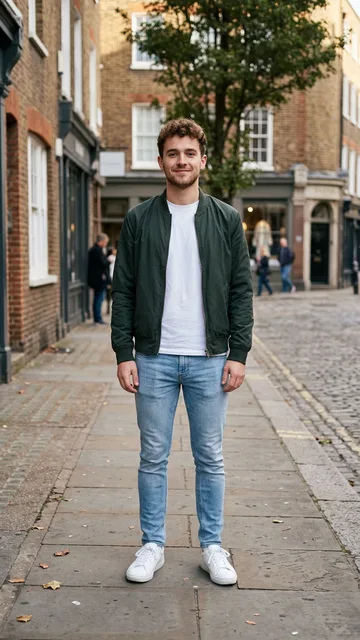 The photo
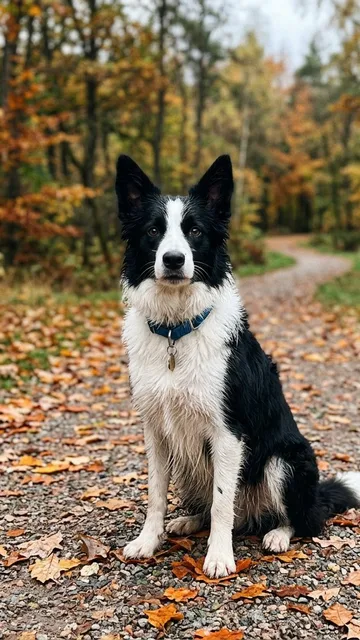 The photo
How to make an AI dance video from a photo
- 1
Add one full-body photo
A phone photo is fine. One person or one pet, standing, with the head and the feet both in the picture.
- 2
Pick the dance and the length
Trend dance for a classic social-media routine, zombie dance for Halloween, pet dance for a cat or dog. 5 seconds loops well; 10 fits a whole routine.
- 3
Press "Make it dance"
The clip comes back in one to three minutes, vertical, with its own beat. Download it and post, or try another dance on the same photo.
Which dance should you pick?
| Trend dance | Zombie dance | Pet dance | |
|---|---|---|---|
| Who it is for | You, a friend, a partner | You or a friend, for Halloween | A cat, a dog or another pet |
| The moves | Two-step, hip rolls, arm waves, a half spin, a final pose | Stiff shuffle, jerking shoulders, clawed hands, a head snap | Up on the hind legs, paw waves, a hop, a spin |
| Where | A neon dance studio | A foggy moonlit graveyard with pumpkins | A cozy living room |
| Look | Exactly as in your photo | You as a zombie: grey-green skin, glowing eyes, torn clothes | Your pet, same breed and markings |
Every dance keeps the face (or the breed and coat) from your photo and comes with an original beat, so there is no copyrighted song inside the clip.
The photo decides how good the dance looks
Almost every bad AI dance video comes from the photo, not the dance. These are the problems people hit most, and what fixes each one.
The face changes halfway through
Use a photo where the face is sharp, lit from the front and not tiny. A selfie crop of the face alone is not enough for a full-body dance; a full-length photo taken from two or three meters works best.
The feet are cut off or the legs melt
If the photo stops at the knees, the AI has to invent the legs and the shoes, and they rarely hold up through a spin. Include the feet.
Two people blend into one
Crop to one person before uploading. Group photos make the model guess who is dancing, and it sometimes merges faces.
Baggy clothes flicker
Long coats, wide dresses and big bags move unpredictably. Fitted clothes, or a dress that stops above the knee, come out cleaner.
Arms or hands look wrong
Arms hanging loose by the sides give the model the clearest start. Crossed arms, hands in pockets and a phone held up are the usual cause of extra fingers.
The background swallows the dancer
The dance moves the person into a new scene, so the old background does not matter, but a dancer in black against a dark wall loses their outline. Pick a photo with some contrast.
Make a zombie dance video for Halloween
Every October, searches for zombie dances, the "Thriller" routine and dancing skeletons jump several times over. The zombie dance on this page is built for that: it turns the person in your photo into a zombie who is still recognisably them, same face, same hair, same outfit, now grey-green, glowing-eyed and dusty, and has them dance the classic stiff-shuffle, claw-hands routine in a foggy graveyard.
It is spooky, not gory: no blood and no wounds, so it is fine for a family group chat or a classroom Halloween post. Post it on its own, or make one of each friend and cut them together into a zombie dance crew.
Want to stay human and turn into a zombie in a picture instead? The zombie filter does that from the same photo.
Make your dog or cat dance
Pet dance videos are some of the most shared AI clips, and they are also where most tools fall short: the dog comes back as a different dog. The pet dance prompt names the breed, the coat, the markings, the eye color and the collar before the first move, so the animal standing up and waving its paws is still yours.
Use a photo of the whole animal, standing or sitting, taken at its eye level rather than from above. Dogs with clear markings (a husky, a corgi, a border collie) and cats with a distinctive coat (a tabby, a tuxedo) give the most convincing results. One animal per photo.
If your pet would rather be a zombie than a dancer, the zombie pet maker turns the same photo into a zombie cat or zombie dog picture.
Posting your AI dance video on TikTok, Reels and Shorts
It is already vertical
Every clip is 9:16, the shape all three apps want, so upload it as it is; no cropping or black bars.
Keep the beat, or swap the sound
The clip has its own original beat. To join a trend, add the trending sound in the app and turn the original volume down; the dance is on a steady tempo, so most pop sounds sit on it well.
Show the before
Open on the still photo for half a second before the dance starts. The "it was just a photo" moment is what makes people stop scrolling.
Loop the 5-second version
Short clips that loop cleanly get watched more than once. Use the 5-second length for loops and the 10-second one for a full routine.
Label it as AI
TikTok, Instagram and YouTube all ask creators to mark realistic AI video. Turn on the AI-generated label when you post.
AI dance video prompts you can copy
These are the exact prompts the maker sends with your photo. To use another video generator that takes a reference image, upload your photo there as the first image and paste one of these.
Trend dance prompt
Image 1 is the dancer. Keep the person from Image 1 exactly as they are: the same face, hairstyle, hair color, skin tone, body shape and outfit, in every frame and through every turn. The dancer performs an upbeat viral social-media dance in a bright studio with a pink and blue neon light wall and a glossy floor: a bouncy two-step, hip rolls, arm waves and quick hand moves on the beat, a half spin, and a confident final pose with a smile at the camera. Vertical 9:16, full body in frame from head to feet the whole time, the camera steady at chest height with a slow push-in. Crisp natural motion with clothes and hair moving with the body. Catchy original dance-pop beat. One subject only, no other dancers, no text, no logos.
Zombie dance prompt
Image 1 is the dancer. Turn the person from Image 1 into a Halloween zombie who is still clearly them: the same face shape, hairstyle, hair color, build and outfit, now with grey-green skin, dark rings around pale glowing eyes and a torn, dusty version of their clothes. In a foggy moonlit graveyard with crooked headstones and a few glowing jack-o-lanterns, the zombie dances a sharp 80s music-video style zombie routine: a stiff shuffle forward, shoulders jerking on the beat, clawed hands raised and swiped side to side, a head snap, a slide back and a final pose with both claw hands up toward the camera. Vertical 9:16, full body in frame from head to feet the whole time, the camera steady at chest height with a slow push-in. Spooky and fun, never gory: no blood, no wounds, no bone. Funky original synth-and-bass Halloween beat with a little howl. One subject only, no other dancers, no text, no logos.
Pet dance prompt
Image 1 is the pet. Keep it unmistakably the same animal: the same species and breed, body shape, fur color, pattern and markings, eye color and collar. The pet stands up on its hind legs in a cozy living room and dances to the beat like a cartoon character but with realistic fur: bobbing its head, waving its front paws side to side, a little hop and a wiggle, a quick spin, and a final pose with one paw raised and its tongue out. Vertical 9:16, the whole animal in frame the whole time, the camera low at the pet's height. Cute and funny. Cheerful original bouncy pop beat. One animal only, no people, no text, no logos.
How much does an AI dance video cost?
A 5-second dance costs 200 credits and a 10-second one 400. Every new account gets 100 free credits to try the site.
After that, the smallest credit pack is 600 credits for $9.9, with no subscription. Uploading a photo costs nothing, and if a render fails the credits go straight back to your balance.
Dance responsibly
- Use your own photo, or a photo of someone who said yes.
- No photos of children, and no public figures or celebrities.
- Nothing that puts a real person in a sexual or humiliating video.
- Label the post as AI-generated wherever the platform asks you to.
AI dance video FAQ
How do I make an AI video of me dancing?
Upload one full-body photo of yourself to the maker at the top of this page, keep "Trend dance" selected, pick 5 or 10 seconds and press "Make it dance". The video comes back in one to three minutes with your face, hair and outfit, and its own beat.
Can I make an AI dance video from a photo without an app?
Yes. Everything runs in the browser on a phone or a computer, so there is nothing to download. You only need an account so the video can be saved to your history.
Is there a free AI dance video generator?
New accounts get 100 free credits. A 5-second dance costs 200 credits and a 10-second one 400, so the free credits let you try the site and a credit pack covers the dance. The prompts on this page are free to copy into any other generator.
What is the AI that makes you dance?
It is an image-to-video model that takes your photo as a reference for who to draw and a written description of the dance. This page runs H3 Max, a version of MiniMax H3, which keeps a face steady through fast movement and writes the music in the same pass.
How do I make an AI video of my dog dancing?
Choose "Pet dance" and upload a photo of your dog where the whole body is visible. The prompt keeps the breed, coat, markings and collar, then stands the dog up on its hind legs for a paw-waving, hopping dance. Cats, rabbits and other pets work the same way.
Does the dance video come with a song?
Yes, every clip has an original beat made with the video, so you can post it as it is. If you want a trending sound, add it in TikTok, Instagram or YouTube and turn the original volume down.
Can I choose the song or the exact dance moves?
Not on this maker: each dance is a fixed routine with its own beat, which is what keeps it one click. For full control, copy a prompt from this page into a general video generator and rewrite the moves.
What is a zombie dance video?
A Halloween version of the AI dance: the person in your photo turns into a zombie who still looks like them and does a shuffling, claw-handed zombie routine in a foggy graveyard. It is spooky without any gore.
Can two people dance together in one video?
This maker makes one dancer per photo, which keeps the face accurate. For a duo, make one clip of each person and put them side by side in a split-screen layout in your editing app.
What photo works best for an AI dance video?
A sharp, full-length photo of one person or pet, taken from a few meters away, with the face lit from the front, the feet in the frame and the arms loose by the sides.
Got a photo? Make it dance.
One full-body photo, one dance, one click, and it is ready to post.
Make it danceHerramientas relacionadas
Otras páginas que abren el mismo estudio, preparado para otro tipo de video.