
Animate Old Photos: Bring Old Photos to Life with AI
Upload one old photo, pick how the people in it should move, and get a 5 or 10 second clip that starts on your photo exactly as it is: the same faces, the same grain, still black and white if it was. Faded, spotted or torn? Repair or colorize it first with the restorer next to it.
The clip keeps your photo's own shape. New accounts get 100 free credits, enough for a 5 second clip.
Old Photos Brought to Life
Each clip below started as a real photograph from 1893 to 1910, in the public domain, put through this maker with the movement named under it. Nothing was retouched afterwards. Press play to see the original turn into the clip.
How to Animate an Old Photo
- 1
Get a clean copy of the print
Scan it at 600 dpi, or photograph it flat in daylight by a window, straight on, with no glare or flash. Crop off the card mount and the album page.
- 2
Repair it if it needs it
Spots, scratches and fading get animated along with the faces. Run the photo through the restorer tab first, download the result, and use that.
- 3
Pick a movement and a length
Gentle for a single portrait, Group for two or more people, Wave or Turn and smile when you want a moment that feels like hello. Five seconds is plenty for most photos.
- 4
Bring it to life and download
The clip takes about a minute. It downloads as an MP4 you can send, post or add to a slideshow, in the same shape as your photo.
Restore First, Then Animate
Animation copies whatever is in the first frame, so a speck of dust on a cheek becomes a speck that moves with the cheek. If your photo has any of these, restore it before you animate it:
- White spots, mould marks or water stains, especially near faces
- Scratches, creases or a tear across the picture
- Faces so faded that the eyes are hard to see
- A low-resolution scan or a blurry phone photo of the print
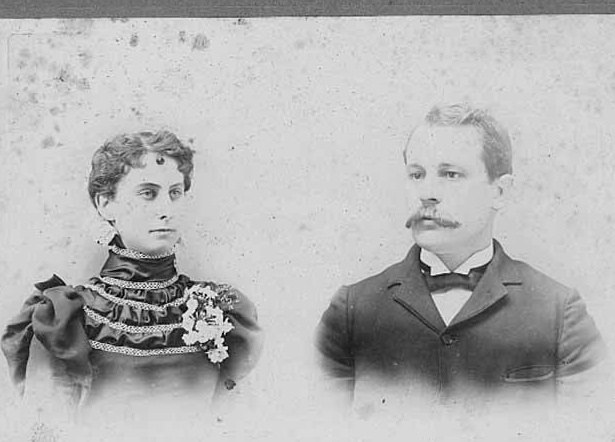
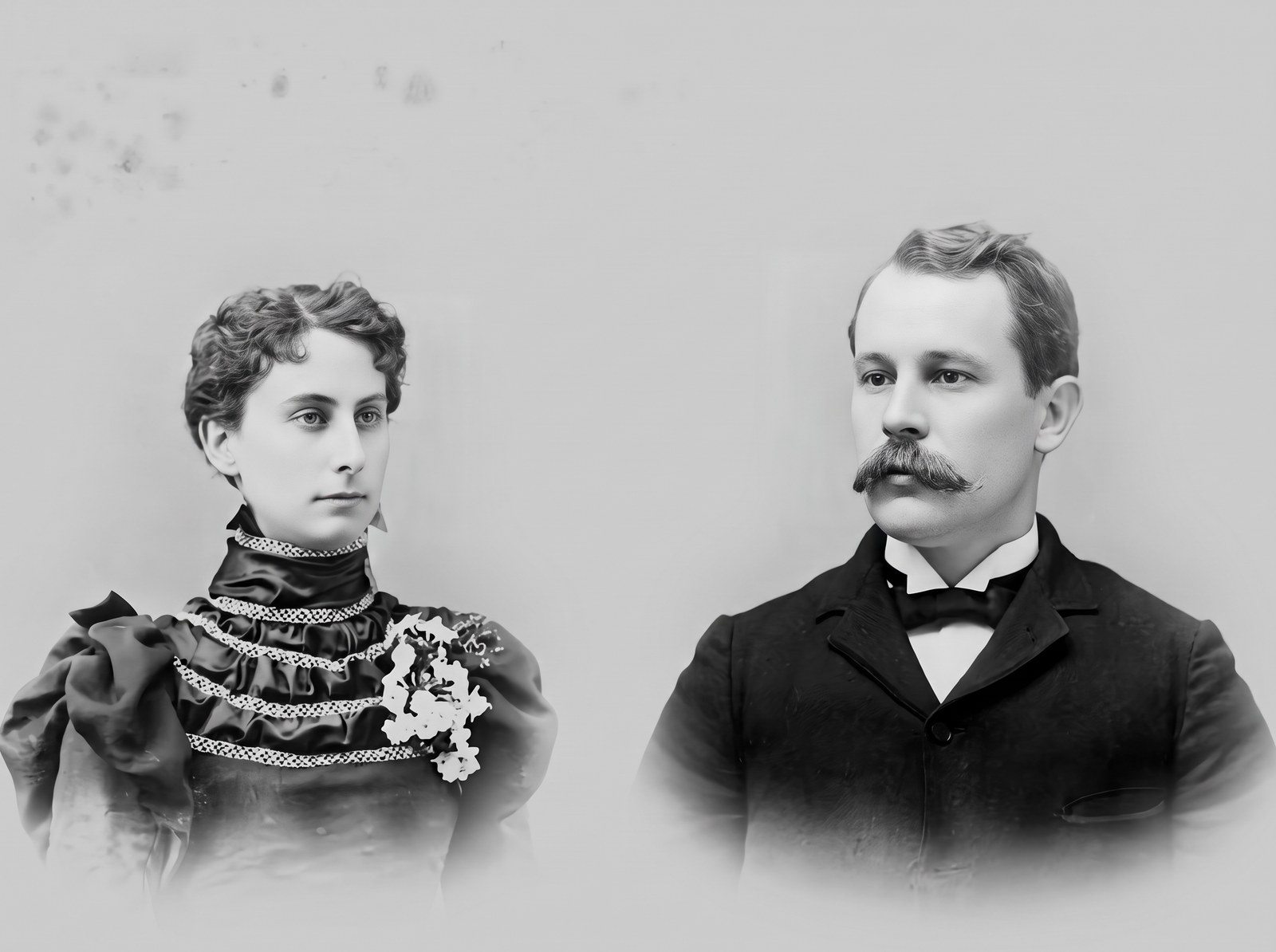
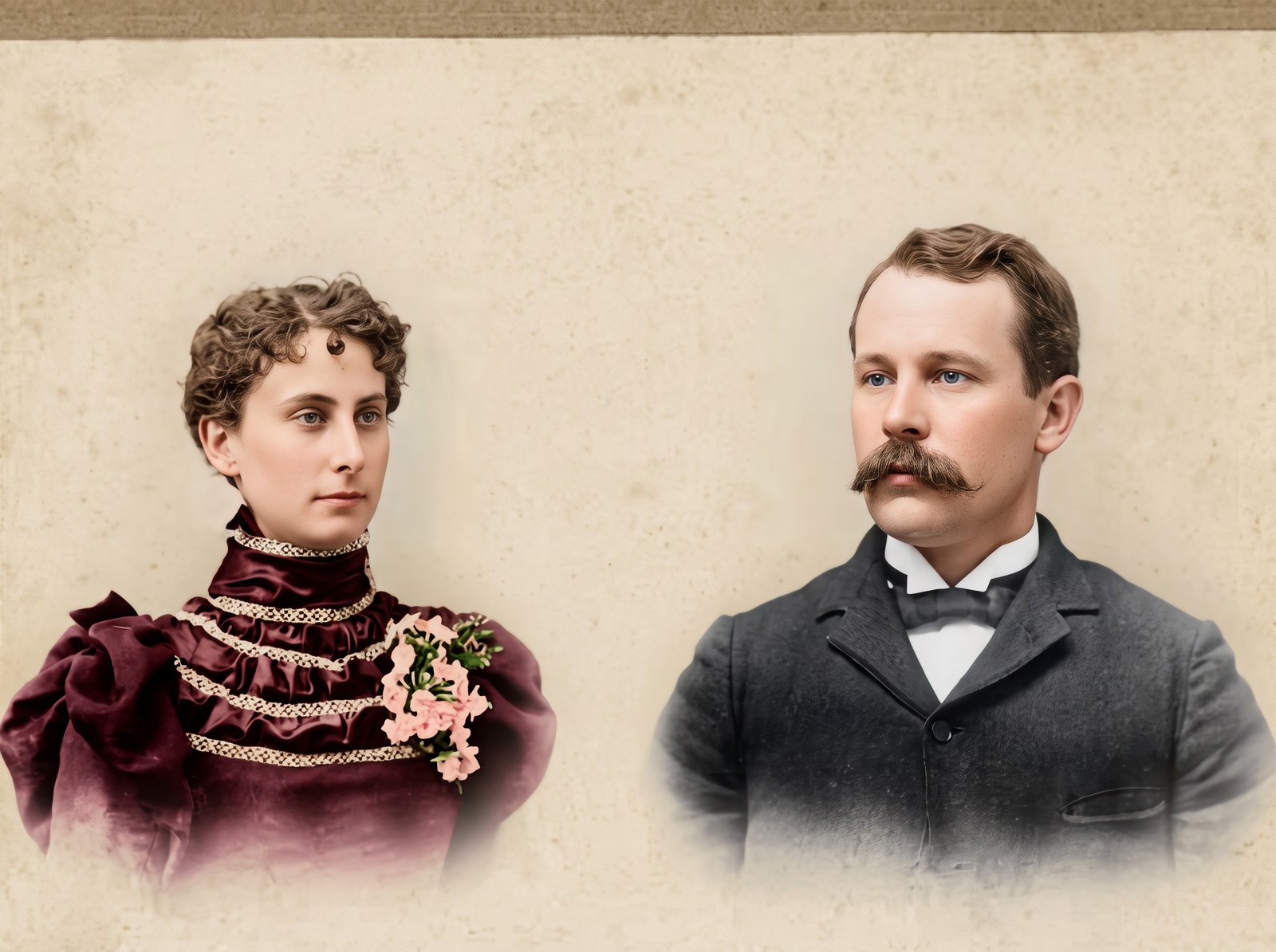
The restorer costs 60 credits a picture and returns a 2K image. Choose “Repair, keep black and white” to stay faithful to the original, or “Repair and colorize” for natural period colors. Then download it and animate it in the first tab.
Which Movement Suits Your Photo
| Movement | What happens | Best for |
|---|---|---|
| Gentle: blink and breathe | Breathing, blinking, a faint smile, almost no head movement | Formal studio portraits, serious faces, a first try on any photo |
| Turn and smile | The head turns to the camera, a warm smile and a small nod | Portraits where the person looks away from the lens |
| Wave hello | A smile and a wave of one hand, then back to the pose | Half or full-length photos with a hand in view, children |
| Group or couple | Everyone moves a little on their own; children wiggle and look around | Couples, families, wedding and group photos |
Head-and-shoulders photos with a hand out of frame do better with Gentle or Turn and smile: the model has to invent a hand to wave.
Why Some Animated Photos Look Creepy, and How to Avoid It
Most complaints about animated old photos, on Reddit and in reviews, come down to the same few things. This maker is set up to avoid them, and the same rules apply in any app:
Too much movement
Real people in a still moment barely move. Big head turns and wide smiles push a face into the uncanny valley. Start with Gentle; save Wave for when you want a gesture.
The photo gets “modernised”
Some tools smooth the skin, sharpen everything and change the light, so great-grandma looks like a filter. Every prompt here tells the model to keep the photo’s own grain, tones and background.
A face that changes
Clips that run long or ask for a lot drift away from the original face. Five seconds and small motions keep the face the face. If a result drifts, try again: each run is different.
Tiny or blurry faces
If a face is only a few pixels wide in the scan, the model has to guess it. Scan at a higher resolution, crop closer to the people, or restore first.
Music or voices
A soundtrack nobody chose makes a clip feel fake. These clips carry only a quiet room tone, so you can add your own music or play them silent.
Prompts for Animating Old Photos
These are the exact prompts the maker sends with your photo. If you use another image-to-video tool, such as Kling, Veo in Gemini or Grok Imagine, upload your photo as the first frame and paste the one you want.
Gentle: blink and breathe
This old photograph comes to life. The person breathes softly, blinks naturally, and their expression warms into a faint, gentle smile; the head moves only slightly. Keep the photo's own look throughout: the same black-and-white or faded colors, the same grain, the same lighting and the same background. Keep every person exactly as they are in the photo: the same face and features, the same age, the same hair, the same clothing and the same pose. The camera stays still or pushes in very slowly. Natural, gentle human movement at real-life speed; no morphing, no extra people, no text. Quiet room tone, no music, no speech.
Turn and smile
This old photograph comes to life. The person slowly turns their head to look straight into the camera, smiles warmly and gives a small nod. Keep the photo's own look throughout: the same black-and-white or faded colors, the same grain, the same lighting and the same background. Keep every person exactly as they are in the photo: the same face and features, the same age, the same hair, the same clothing and the same pose. The camera stays still or pushes in very slowly. Natural, gentle human movement at real-life speed; no morphing, no extra people, no text. Quiet room tone, no music, no speech.
Wave hello
This old photograph comes to life. The person looks into the camera, smiles and lifts one hand to wave hello, then lowers it again. Keep the photo's own look throughout: the same black-and-white or faded colors, the same grain, the same lighting and the same background. Keep every person exactly as they are in the photo: the same face and features, the same age, the same hair, the same clothing and the same pose. The camera stays still or pushes in very slowly. Natural, gentle human movement at real-life speed; no morphing, no extra people, no text. Quiet room tone, no music, no speech.
Group or couple
This old group photograph comes to life. Everyone in it moves a little, each in their own way: they breathe, blink, glance at each other or toward the camera and smile; a child or baby wiggles and looks around. Nobody leaves the frame and no one new appears. Keep the photo's own look throughout: the same black-and-white or faded colors, the same grain, the same lighting and the same background. Keep every person exactly as they are in the photo: the same face and features, the same age, the same hair, the same clothing and the same pose. The camera stays still or pushes in very slowly. Natural, gentle human movement at real-life speed; no morphing, no extra people, no text. Quiet room tone, no music, no speech.
Restoring prompts
Repair, keep black and white
Restore this old photograph. Remove the scratches, dust, spots, stains, creases and tears; repair faded or missing areas; sharpen the faces and fine detail naturally; even out the contrast. Keep it a black-and-white photograph with its original tones. Keep every person exactly as they are in the photo: the same face and features, the same age, the same hair, the same clothing and the same pose. Keep the framing, the background and the composition; do not add or remove anyone. No text, no watermark, no border.
Repair and colorize
Restore and colorize this old photograph. Remove the scratches, dust, spots, stains, creases and tears; repair faded or missing areas; sharpen the faces and fine detail naturally; even out the contrast. Then add natural, true-to-period color: realistic skin tones, believable hair and eye colors, and fabric colors that suit the era of the clothing, under soft natural light. Keep every person exactly as they are in the photo: the same face and features, the same age, the same hair, the same clothing and the same pose. Keep the framing, the background and the composition; do not add or remove anyone. It should look like a clean color photograph taken at the time, not a painting. No text, no watermark, no border.
What People Make with Animated Old Photos
- A clip of grandparents on their wedding day for an anniversary party
- A moving portrait for a memorial slideshow or a celebration of life
- A family history post with an ancestor who finally blinks back
- A surprise for a parent: their own baby photo, smiling at them
- Genealogy research shared with relatives who have never seen the face move
- A birthday video that opens on an old photo of the birthday person
Using Photos of People Who Are Gone
- An animated photo is an imagined moment, not a recording. Say so when you share it, especially with people who knew the person.
- Ask close family before posting a clip of someone they lost; some find it moving and some find it hard to watch.
- Only upload photos you have the right to use. Photos from archives and museums often allow it; check the licence.
- Never use an animated photo to make it look like someone said or did something they did not.
Animate Old Photos: Questions
How can I animate old photos for free?
Sign up and you get 100 free credits, which covers a 5 second clip (100 credits). Upload the photo, keep Gentle selected and press Bring it to life. After that, 5 second clips cost 100 credits and 10 second clips 200; the smallest credit pack is 600 credits for $9.9.
How do people animate old photos?
With an image-to-video AI model: the photo is used as the first frame and the model predicts the next few seconds of natural movement, such as breathing, blinking and a smile. The photo itself is not changed, which is why the clip opens on it exactly as it was.
Can ChatGPT animate a photo?
ChatGPT can restore or colorize an old photo as a picture, but turning a photo into a moving clip takes an image-to-video model. You can paste the prompts on this page into any tool that animates from a first frame, or use the maker at the top, which sends them for you.
What is the best app for animating old photos?
It depends on the photo. MyHeritage’s Deep Nostalgia animates a face with set head movements; video tools such as Canva, VEED and Kling animate the whole picture. This maker animates the whole photo, keeps the original grain and tones, handles groups, and has a restorer next to it for damaged prints.
Does it work with black-and-white photos?
Yes, and they stay black and white: the prompt tells the model to keep the photo’s own tones. If you want color, run the photo through the restorer with “Repair and colorize” first, then animate the colored version.
Should I restore the photo first?
Only if it has spots, scratches, stains or faded faces, because those move along with the picture. The restorer costs 60 credits and returns a clean 2K picture to animate.
Can I animate a group or family photo?
Yes. Pick Group or couple: each person moves a little on their own and nobody new appears. Faces should be large enough to see clearly; crop a big group photo closer to the people you care about most.
Will it change their faces?
The clip starts on your photo unchanged, and the prompt asks for small, real-speed movements that keep each face as it is. In our tests faces held for the whole clip. If one drifts, run it again or switch to Gentle.
How long does it take, and how long is the clip?
Clips are 5 or 10 seconds long and usually finish in about a minute. They come out as MP4 files in the same shape as your photo.
What photos work best?
A sharp scan with faces turned toward the camera and big enough to see the eyes. Studio portraits, wedding photos and family snapshots all work. Very small faces, heavy blur or a photo of a photo at an angle give weaker results.
See Them Move Again
One old photo, about a minute, and a clip you can share with the whole family.
Animate a photoRelated tools
Other pages that open the same studio, set up for a different kind of video.
- AI Video EffectsEvery AI video effect on the site, each one ready to run on a photo.
- AI Hug GeneratorTwo separate photos into a video of the two of you hugging.
- MiniMax H3 Video GeneratorMiniMax H3 videos with sound, on H3 Max in your browser.
- Wan AI Video GeneratorWan 3.0 videos up to 30 seconds, in 1080p with sound.
- AI ModelsEvery video and image model, with lengths and prices.